
Preparing Your REAPER Project
ReaSetlist LIVE reads your project structure directly from REAPER using Regions and Markers.
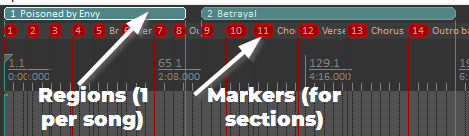
Songs = Regions
Each song in your setlist must be defined as a Region in REAPER. The Region defines the start and end of the song, and its name will be used as the song title.
Sections = Markers
Use Markers inside each Region to define song sections like Intro, Verse, Chorus, or Bridge. These sections appear in Live Mode for easy navigation.
Best Practices
- Keep names clear and short for stage visibility.
- Avoid overlapping Regions.
- Ensure Regions fully cover the song timeline.